
Friendly Feed for Astro: a feed page people can actually read
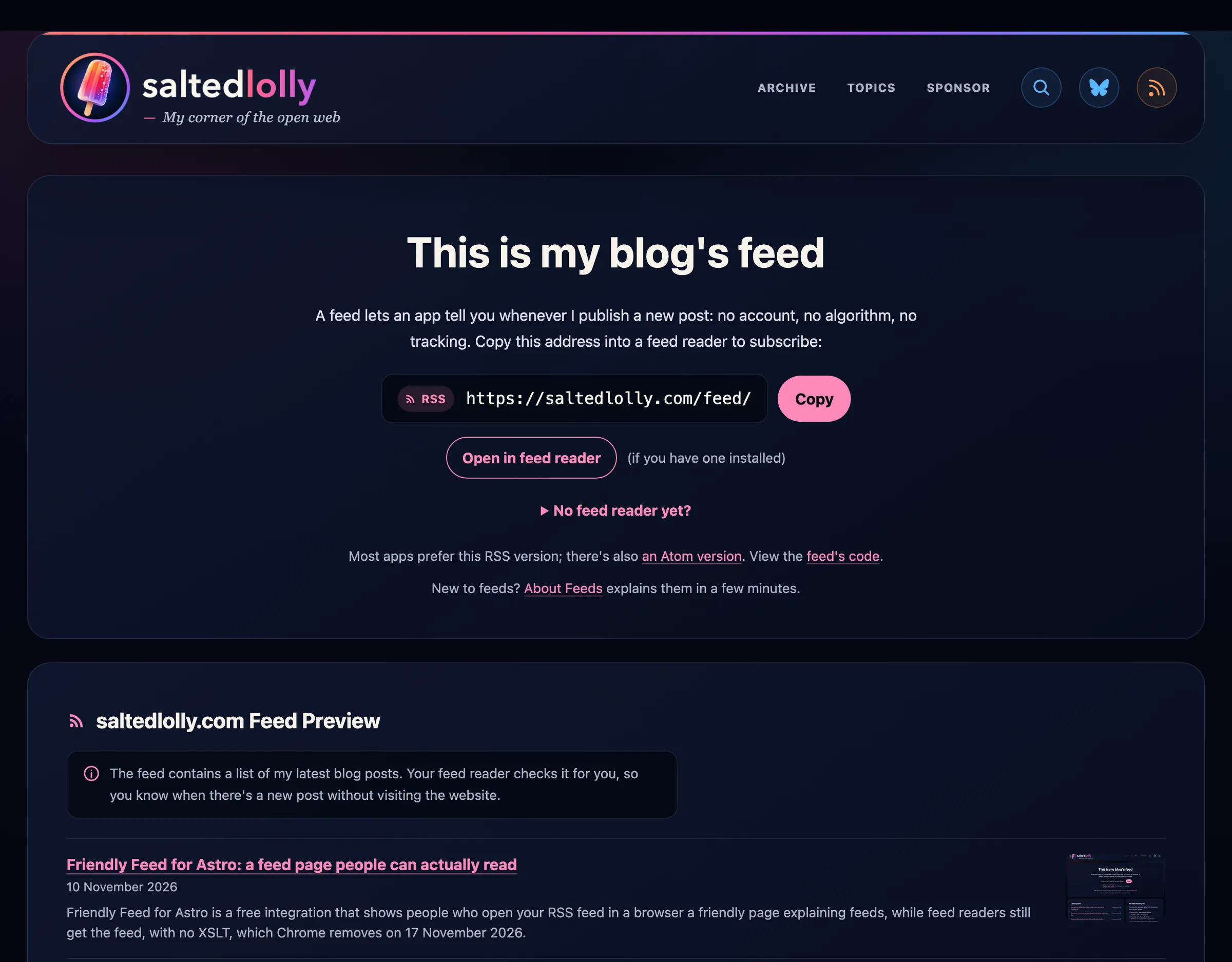
When someone clicks the RSS button on a blog, their browser usually shows them a wall of code. People who already use a feed reader know to copy the address. For everyone else it looks broken, or a bit scary, and they leave. Friendly Feed for Astro fixes that for Astro sites: anyone who opens your feed in a browser gets a friendly page at the same address, explaining what a feed is and how to follow you, while feed readers get the feed exactly as before. It’s free and open source.
It’s live on this site: open saltedlolly.com/feed/ in your browser, then paste the same address into a feed reader. DigiNode Tools uses it too, in its own design.
Why I made it
When I rebuilt this site I clicked my own RSS button and got this:
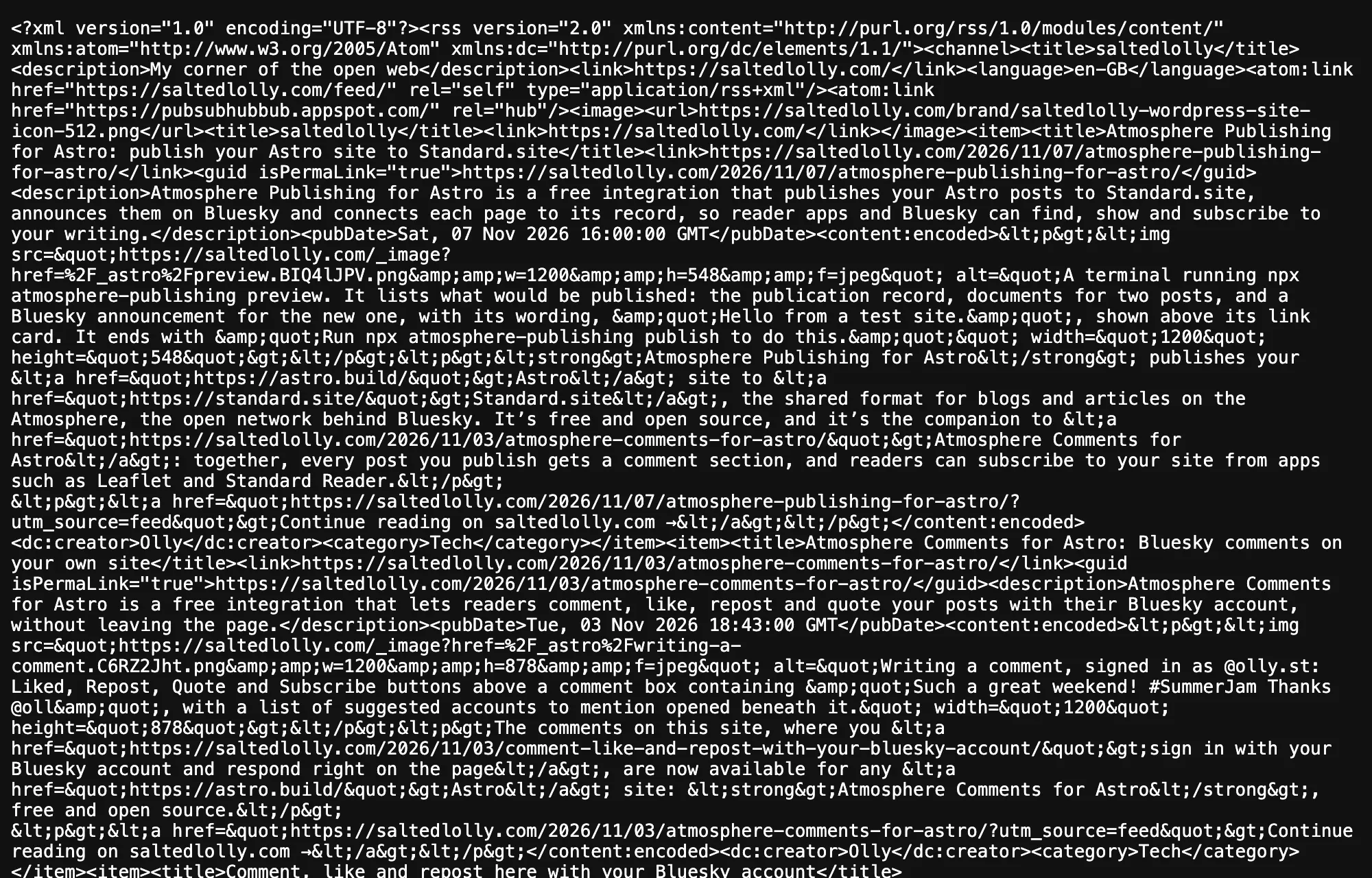
Feeds are one of the best things about the open web: you follow a site without an account, an algorithm or tracking, and nobody can take your subscriptions away. But hardly anyone outside tech knows what to do with one, and a page of XML doesn’t help.
Why not a feed stylesheet?
The usual fix has been an XSLT stylesheet, which tells the browser to dress the feed up as a web page. That’s ending: Chrome removes XSLT on 17 November 2026 (Chrome 158), and Edge, Firefox and Safari plan to follow. Sites that style their feeds that way will go back to showing raw code.
Friendly Feed doesn’t style the feed at all. It shows a real page to people and the real feed to feed readers, so nothing depends on the browser understanding XML.
How it tells them apart
When you open an address in a browser tab, the browser quietly tells the site so: it sends two headers, Sec-Fetch-Dest: document and Sec-Fetch-Mode: navigate. Feed readers never send them, and web pages can’t fake them.
So the integration’s middleware looks at each request for your feed. A browser tab gets your feed page instead (an Astro rewrite, so the address in the address bar stays the feed’s). Everything else, from feed readers to scripts that fetch your feed, gets the feed. Both answers tell any cache in front of your site that they differ, so a CDN or proxy cache can never hand the page to a feed reader. If the page ever fails, the visitor simply gets the feed.
Adding ?raw to the address shows the feed’s code in a browser, for the curious; the page links to it.
What’s on the page
- What a feed is, in one sentence, and the address, marked with its type (RSS, Atom or JSON Feed), with a Copy button.
- Open in feed reader, which hands the feed to a reader app if one is installed.
- No feed reader yet?: folded away beneath, six readers for different needs (NetNewsWire, NewsBlur, Folo, Fluent Reader, Feeder and Inoreader), each saying whether it’s free and open source or freemium, and which devices it’s on. You can list your own instead.
- Your other feeds, if you have more than one (this site has RSS and Atom).
- A preview of the feed: your latest posts, with a short note explaining that a feed reader checks the feed for you, so people can see what a feed is and what they’d be subscribing to. Each post shows its title and date, plus a summary and picture if you give them.
- Other ways to follow: a space for anything else, such as a newsletter, Mastodon or Bluesky. On this site it has the Subscribe and Follow buttons from Atmosphere Comments for Astro and the fediverse addresses.
It uses your own layout, fonts and colours, and works in light and dark. Visited at its own address (here, /subscribe/), it doubles as a “Follow” page.
Add it to your own site
It’s on npm as astro-friendly-feed and on GitHub. You’ll need an Astro site with a server adapter, such as @astrojs/node.
npm install astro-friendly-feedAdd the integration to astro.config.mjs, with your feeds’ addresses:
import friendlyFeed from "astro-friendly-feed";

export default defineConfig({
  integrations: [friendlyFeed({ feeds: ["/rss.xml"], name: "My blog" })],
});
Make your feed routes on demand (export const prerender = false;), so the middleware sees each request, then add the page, src/pages/subscribe.astro, inside your own layout:
---
import FeedPage from "astro-friendly-feed/FeedPage.astro";
import Layout from "../layouts/Layout.astro";

export const prerender = false;
---

<Layout title="Subscribe">
  <FeedPage posts={latestPosts} allPosts="/blog/" />
</Layout>
Then open your feed in a browser. The build warns you if a feed or the page is built as a file, where the middleware can’t reach it.
The README covers the options (your own feed readers, wording and language), styling with CSS variables, and how to do the same on a fully static site with a few lines of Nginx.
Support my work
Friendly Feed for Astro is free and open source. I make software like this because I believe in open protocols and open source: they can help make the web, and so the world, a better place, and the web shouldn’t be owned and controlled by billionaires. Building and maintaining it takes real time, often my working hours. If you find it useful, please consider sponsoring me on GitHub or buying me a coffee on Ko-fi: it helps me keep it going.
Release notes
What’s changed in each version. The changelog on GitHub has the full detail for developers.
0.3.0 (10 November 2026)
- A preview of the feed, front and centre. Your latest posts appear under “example.com Feed Preview”, with a note explaining that a feed reader checks the feed for you, so people who have never used a feed can see what one is. Posts can now have a summary and a picture.
- “No feed reader yet?” folds away under the buttons, so the preview stands out.
- The address shows the feed’s type: a small RSS, Atom or JSON Feed badge.
- The page is now one column: the address, then the preview, then your other ways to follow.
0.2.1 (10 November 2026)
- More space between the two small lines under the address, so they’re easier to read.
0.2.0 (8 November 2026)
- Six feed readers for different needs: NetNewsWire, NewsBlur, Folo (with AI summaries), Fluent Reader, Feeder and Inoreader, each saying whether it’s free and open source or freemium, with the devices it’s available on beneath. Feedly is gone.
- Your own feed readers can list their devices too.
0.1.0 (8 November 2026)
- First release, built from this site’s feed page: the middleware, the
<FeedPage />component,?raw, build warnings, and the wording in a language file ready for translations.
Friendly Feed for Astro is an independent project, not made or endorsed by Astro.
Enjoyed this? Support my work
GitHub Sponsors
Sponsor monthly with your GitHub account.
Sponsor on GitHubKo-fi
Donate once by card or PayPal.
Donate on Ko-fiComments
Other websites can respond by sending a Webmention.
Powered by Atmosphere Comments for Astro