
Atmosphere Comments for Astro: Bluesky comments on your own site
The comments on this site, where you sign in with your Bluesky account and respond right on the page, are now available for any Astro site: Atmosphere Comments for Astro, free and open source.
It’s exactly what this site uses, so the comment section at the bottom of this page is the demo: sign in with your Bluesky account and try it. Your readers get the same: they comment, reply, like, repost and quote with their own Bluesky (or other Atmosphere) account, without leaving your page, and everything they post stays in their own account.
What your readers see
Before they sign in, readers see who has liked and reposted your post, the comments, and a Respond with your Atmosphere Account button:

They type their handle and approve on their own account’s sign-in page (Bluesky’s, for most people). Back on your page, they can like, repost or quote your post, and write a comment. As on Bluesky, #hashtags and links become links, and typing @ suggests people to mention:
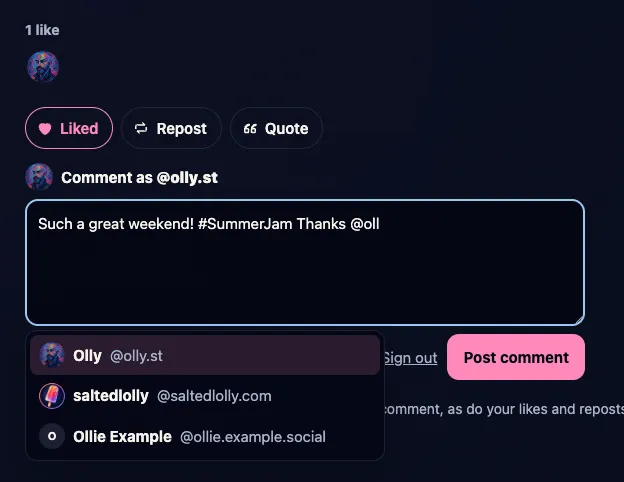
Every comment also gets its own Reply, Like and Repost, and replies are shown nested under the comment they answer.
Add it to your own site
The integration is on npm as astro-atmosphere-comments and on GitHub. As far as I know it’s the first Astro integration that lets readers comment, like and repost through their own Bluesky account.
You’ll need an Astro site with a server adapter (such as @astrojs/node) and a Bluesky account that announces your posts. Then:
npm install astro-atmosphere-comments
npx astro-atmosphere-comments keygen
Add the integration to astro.config.mjs, with the DID of the account that announces your posts:
import atmosphereComments from "astro-atmosphere-comments";

export default defineConfig({
  site: "https://example.com",
  adapter: node({ mode: "standalone" }),
  integrations: [
    atmosphereComments({
      clientName: "example.com",
      allowedAuthors: ["did:plc:your-did-here"],
    }),
  ],
});
And put the component under your posts, with the address of the post’s Bluesky announcement:
---
import AtmosphereComments from "astro-atmosphere-comments/AtmosphereComments.astro";
---

<AtmosphereComments post="https://bsky.app/profile/you.bsky.social/post/…" />
If you already publish your posts to Standard.site, you can leave out post: the component finds the announcement from the page’s Standard.site record by itself.
The README covers the rest: the options, styling it to match your site, and what it stores. It’s free and open source (MIT). Bug reports and ideas are very welcome on GitHub, or in the comments below.
Support my work
The integration is free, like all my software, and I build it in my spare time. If you find it useful, please consider sponsoring me on GitHub or buying me a coffee on Ko-fi. More ways to support my work →
Atmosphere Comments for Astro is an independent project, not made or endorsed by Bluesky or Astro. The Atmosphere Account logo is from Atmosphere Account (MIT).
Enjoyed this? Support my work
GitHub Sponsors
Sponsor monthly with your GitHub account.
Sponsor on GitHubKo-fi
Donate once by card or PayPal.
Donate on Ko-fiComments
Respond on Bluesky →Your reply appears here as a comment, as do your likes and reposts.Other websites can respond by sending a Webmention.
Powered by Atmosphere Comments for Astro