
Nixel Clock: a nixie tube clock for your pixel display, now sharper and glowing
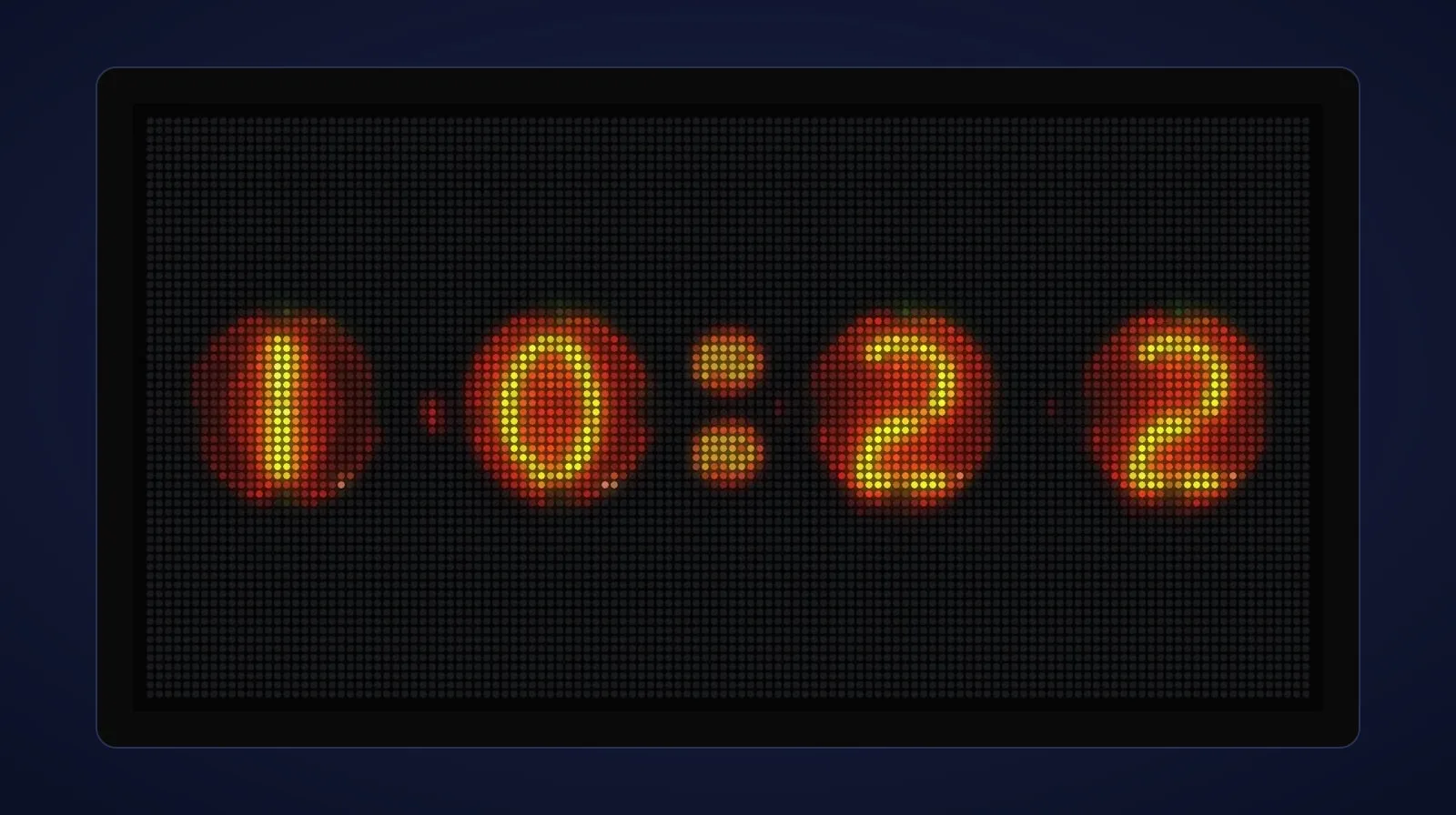
Nixie tubes are one of those nostalgic pieces of old technology: glass tubes filled with neon, with a wire shaped like each digit inside, which glows orange when it’s lit. Nixel Clock is my pixel version of a nixie tube clock, for Tidbyt and Tronbyt displays. I first released it in 2022 for the Tidbyt, and recently updated it to support the larger 128×64 and square 64×64 pixel displays supported by Tronbyt, adding new artwork, and giving the tubes a gentle glow effect.
A clock made of nixie tubes, in pixels
Nixie tubes were at their height from the 1950s to the 1970s, used for the number displays on scientific instruments, calculators and early computers, before LEDs replaced them. Their warm glow has made them popular again for clocks, which is where the idea for this app came from: a nixie tube clock, made of pixels. Nixie + pixel = Nixel.
The digits are made from photos of real nixie tubes, shrunk down to fit the display, so they keep the look of the real thing: the glowing wire numbers, the glass behind them and the warm orange light. There are two styles, each in a brighter and a darker version:
- Round: short round tubes, side by side.
- Tall: tall tubes that fill the display.
You can also choose 12- or 24-hour time, a leading zero (09:30 instead of 9:30), and a colon that blinks once a second.
What’s new in this update
Sharper on 128×64 displays
Newer displays made for Tronbyt, such as the wide Tronbyt S3 Dev Kit, have four times as many pixels as an original Tidbyt: 128×64 instead of 64×32. Rather than simply enlarging the old artwork, I made new artwork for these displays from the same nixie tube photos I used for the original, so the tubes have twice the detail. Here’s the original on a Tidbyt-sized display, and the new version on a 128×64 one:
The original, on a 64×32 display.
The new artwork, on a 128×64 display.
The Tall style looks especially good at the higher resolution:
Tall (Brighter) on a 128×64 display, gently glowing.
A gentle glow
Real nixie tubes never look perfectly still: their glow shifts very slightly. Nixel Clock now copies that. Each tube brightens and dims very gently on its own, by no more than about 8%, so it looks lit rather than printed. It’s subtle on purpose: you notice the clock feels alive, rather than seeing it flicker. The glow is on by default, and you can switch it off in the app’s settings.
Square displays
On a 64×64 display, the clock now sits in the middle of the screen, instead of at the top.
Smaller touches
- A new colon for the Tall styles, in the same colour as the tall tubes’ glowing wire, with a faint red glow behind it. They used to borrow the Round style’s colon.
- Tidier Tall digits. I remade them from the original photo so every digit is the same height and properly centred (the 5 used to stand taller than the others).
- “Flashing separator” is now called “Blinking colon”, which says what it does. Your saved setting is kept.
Where it came from
I first published Nixel Clock in the Tidbyt app store in March 2022, with the Round and Tall styles, and cleaned up the artwork a month later. When the community took over keeping Tidbyt apps going, it moved to the Tronbyt app store along with the others, and this update is the first time I’ve worked on it since.
Get it
Add Nixel Clock from your Tronbyt server’s app list, or see it in the Tronbyt app store. The app’s instructions list all its settings.
What’s a Tronbyt?
Tidbyt is a small LED pixel display that shows things like the time, the weather and your calendar. Tronbyt keeps Tidbyt and other compatible LED pixel displays going, with a server you run yourself and a community app store full of apps for your display. You’ll need:
- A pixel display that works with Tronbyt. An original Tidbyt works once you’ve installed Tronbyt’s firmware on it, or you can buy one made for Tronbyt, such as the Tronbyt S3 Dev Kit from PixoHardware: a wide 128×64 display that arrives with its firmware already installed.
- A Tronbyt server to run it.
Run Tronbyt on your Umbrel
If you have an Umbrel home server, you can run your Tronbyt server on it. My saltedlolly App Store for Umbrel includes Tronbyt, so your display doesn’t depend on anyone else’s servers. I explain how it works, and why I made it, in I made a Tronbyt app for Umbrel. To add the store, open the App Store on your Umbrel, click ••• at the top right, then Community App Stores, paste https://github.com/saltedlolly/umbrel-app-store and click Add.
Support my work
Nixel Clock is free and open source. I make software like this because I believe in open protocols and open source: they can help make the web, and so the world, a better place, and the web shouldn’t be owned and controlled by billionaires. Building and maintaining it takes real time, often my working hours. If you find it useful, please consider sponsoring me on GitHub or buying me a coffee on Ko-fi: it helps me keep it updated and make new things. More ways to support my work →
Community app stores aren't official Umbrel services: please back up your data and test any app before relying on it.
Enjoyed this? Support my work
GitHub Sponsors
Sponsor monthly with your GitHub account.
Sponsor on GitHubKo-fi
Donate once by card or PayPal.
Donate on Ko-fiComments
Other websites can respond by sending a Webmention.
Powered by Atmosphere Comments for Astro